Infrastructure Documentation
Prerequisites
Before you begin, ensure you have the following installed on your system:
- Docker: Version 20.10 or higher (Install Docker)
- Docker Compose: Version 2.0 or higher (usually included with Docker Desktop)
- Git: For cloning the repository (Install Git)
To verify your installations, run:
docker --version
docker compose version
git --version
Getting Started
1. Clone the Repository
Clone the repository from GitLab:
git clone git@gitlab.com:ikdoeict/vakken/opo_agile_team_project/projecten/2526/2526_atp_dengue/Dengue-Dashboard.git
cd Dengue-Dashboard
2. Environment Configuration
Copy the example environment file and configure it:
# Copy the example environment file
copy .env.example .env
Open the .env file and review the configuration. The default values should work for local development, but you can customize them as needed:
- Database credentials: Default credentials are set for local development
- Admin account: Default admin credentials (change in production!)
- URLs: Frontend and backend URLs (default: frontend on port 5173, backend on port 5000)
Important: For production deployments, make sure to:
- Change the
SECRET_KEYto a secure random string - Update the
ADMIN_PASSWORDto a strong password - Update database credentials (
DB_PASSWORD,MARIADB_PASSWORD,MARIADB_ROOT_PASSWORD) - Configure proper email settings for the SMTP server
3. Start the Application
Build and start all services using Docker Compose:
docker compose up --buildThis command will:
- Build the frontend and backend Docker images
- Start the MariaDB database
- Start the SMTP server (for email testing)
- Start the Adminer database management tool
- Initialize the database with the required schema
this wil not run the tests
First-time setup: The first build may take several minutes as Docker downloads base images and installs dependencies.
4. Access the Application
Once all services are running, you can access:
- Frontend:
http://localhost:5173 - Backend API:
http://localhost:5000 - Adminer:
http://localhost:8080- System: MySQL
- Server: dengue_db
- Username: dengue_user
- Password: Azerty123
- Database: dev_db
- SMTP4Dev:
http://localhost:8081
5. Default Login Credentials
The default admin account credentials are:
- Email: admin@example.com
- Password: Azerty123
⚠️ Important: Change these credentials immediately in production environments!
6. Run the testing suite
this wil run the front/backend tests, and the end-to-end tests
docker compose --profile testing up --buildDeployment Workflow
This project uses a GitLab CI/CD pipeline with three main branches for deployment: feature/*, staging, and main. Each branch triggers different CI behaviors to ensure safe and controlled deployments.
Branch Strategy
Development Branch (development)
- Purpose: A holding/integration branch where completed feature branches are merged and tested together before promoting to
staging. - Workflow:
- Developers work on
feature/*branches and open merge requests intodevelopmentwhen a feature is ready for integration. developmentruns CI (integration tests, broader test suites and builds) to validate that combined features work together.- When the
developmentstate is stable and reviewed, mergedevelopmentintostagingto perform QA and stakeholder demos. - After successful staging validation, merge
stagingintoproduction(ormain) and use the manual approval step to deploy.
- Developers work on
- Use Case: This keeps feature work isolated while letting the team validate combined changes before exposing them in staging.
Feature Branches (feature/*)
- Purpose: Development and testing
- CI Behavior:
- Runs linting and tests
- Builds Docker containers (to catch build errors early)
- Does NOT push containers to registry
- Does NOT deploy to any environment
- Use Case: Validate your changes compile and pass tests before merging
Staging Branch (staging)
- Purpose: Pre-production testing environment
- CI Behavior:
- Runs linting and tests
- Builds and pushes containers with
:stagingtag - Automatically deploys to
dengue-dashboard-stagingnamespace
- Use Case: Integration testing, stakeholder demos, QA validation
Production Branch (production )
- Purpose: Live production environment
- CI Behavior:
- Runs linting and tests
- Builds and pushes containers with
:productionAND semantic version tags (e.g.,:v1.2.3) - Manual approval required before deployment
- Deploys to
dengue-dashboard-prodnamespace after approval
- Use Case: Stable, production-ready releases
Deployment Flow Examples
1. Develop a new feature
# Create feature branch from development
git checkout development
git pull origin development
git checkout -b feature/123-new-feature

# Make changes, commit regularly
git add .
git commit -m "Add new feature"
git push origin feature/123-new-feature

# CI will build containers but NOT push or deploy
# Check pipeline in GitLab to ensure builds succeed
2. Deploy to staging
# Merge feature to staging branch
git checkout staging
git pull origin staging
git merge feature/123-new-feature

# Push to trigger staging deployment
git push origin staging

# CI will:
# - Build containers
# - Push with :staging tag
# - Automatically deploy to staging environment
# - Accessible at http://10.129.80.13:30080
Quick Commands
# Check current branch and status
git status
git branch
Docker Compose
Docker Compose Services
| Service | Profile | Ports | Purpose | Dependencies |
|---|---|---|---|---|
frontend-lint | development | - | Lint frontend code | - |
frontend-test | testing | 51261 | Run frontend unit tests | backend |
frontend-cypress | testing | - | Run Cypress e2e tests | frontend, backend-e2e |
frontend | development, production | 5173 | Serve frontend app | smtp |
backend-lint | development | - | Lint backend code | - |
backend-test | testing | - | Run backend tests | dengue_db |
backend | development, production | 5000 | Serve backend API | smtp, dengue_db |
dengue_db | - | 3307 | MariaDB database | - |
dengue_db_test | testing | 3308 | Test database | - |
backend-e2e | testing | 5001 | Backend for e2e tests | smtp, dengue_db_test |
smtp | - | 8081, 2525 | Email testing server | - |
adminer | - | 8080 | Database management UI | - |
profiles
Docker Compose uses profiles to group services for different environments and purposes. The main profiles are:
Development Profile
- Purpose: Local development environment with hot-reloading, linting, and development servers.
- Services:
frontend-lint,frontend,backend-lint,backend,smtp,dengue_db,adminer. - Usage: Run with
docker compose --profile development upto start development servers and tools. - Key Features: Source code mounting for live changes, development builds, database persistence.
Testing Profile
- Purpose: Automated testing environment replicating CI, including unit tests, e2e tests, and database setup.
- Services:
frontend-test,frontend-cypress,backend-test,dengue_db_test,backend-e2e,smtp. - Usage: Run with
docker compose --profile testing up --buildto execute the full test suite. - Key Features: Isolated test database, report generation, Cypress e2e testing with network mode host.
Production Profile
- Purpose: Production-like setup for local testing of production builds.
- Services:
frontend,backend,smtp,dengue_db,adminer. - Usage: Run with
docker compose --profile production up --buildfor production builds. - Key Features: Optimized builds, health checks, production configurations.
What docker compose up --build does
This command will:
- Build the frontend and backend Docker images
- Start the MariaDB database
- Start the SMTP server (for email testing)
- Start the Adminer database management tool
- Initialize the database with the required schema
Optimizing Build Performance
Speed up frontend builds with pnpm caching. The Dockerfile uses BuildKit cache mounts to persist the pnpm store between builds.
Automatic caching (recommended):
- The
frontend/Dockerfileincludes cache mounts for the pnpm store - Dependencies are cached automatically on subsequent builds
Dockerfile caching example:
RUN --mount=type=cache,id=pnpm-store,target=/app/.pnpm-store \
pnpm install --frozen-lockfileImportant: Commit pnpm-lock.yaml to the repo to ensure deterministic builds and effective caching.
Docker Configuration
Frontend Dockerfile
Stages
| Stage | Base Image | Purpose | Key Actions | Exposed Ports |
|---|---|---|---|---|
builder | node:25-alpine | Base setup for all stages | Install pnpm, dependencies, copy source | - |
lint | builder | Lint frontend code | Run linting commands | - |
test | builder | Run unit tests | Execute Vitest unit tests | 51204 |
cypress | cypress/included:latest | Run e2e tests | Execute Cypress tests | - |
development | builder | Development server | Start Vite dev server | 5173 |
build | builder | Build production assets | Build app with Vite | - |
production | nginx:alpine | Serve production build | Serve static files with nginx | 80 |
Backend Dockerfile
Stages
| Stage | Base Image | Purpose | Key Actions | Exposed Ports |
|---|---|---|---|---|
base | python:3.13-slim | Base setup for all stages | Install system deps, Python packages, copy entrypoint | - |
lint | base | Lint backend code | Run Ruff linting with fixes | - |
development | base | Development server | Run Flask app in development mode | - |
test | lint | Run backend tests | Execute pytest with coverage | - |
production | base | Production server | Run Flask app in production mode | 5000 |
Security Best Practices
It is the intention to use rootless containers to reduce the attack surface by running containers without root privileges.
- Image Security: Scan images for vulnerabilities using tools like Trivy or Docker Scout. Use trusted base images and minimize layers to reduce potential attack vectors.
- Secrets Management: Handle sensitive data (e.g., database passwords) using Docker secrets or environment variables. Avoid hardcoding secrets in Dockerfiles or Compose files.
- Network Security: Expose only necessary ports, use internal networks for service communication, and avoid running containers in privileged mode.
Networking and Service Communication
Services communicate via Docker's default network or custom networks defined in docker-compose.yml.
- Internal Communication: Services can reach each other using service names as hostnames (e.g.,
backendconnects todengue_dbviadengue_db:3306). - Port Mappings: External ports are mapped as listed in the services table. Internal ports are used for inter-service communication.
- DNS Resolution: Docker Compose provides automatic DNS resolution for service names within the network.
Volumes and Data Persistence
- Database Volumes: The
dengue_dbservice uses named volumes to persist data across container restarts. Ensure volumes are backed up regularly. - Backup/Restore: Use
docker execto runmysqldumpfor backups:docker exec dengue_db mysqldump -u root -p dengue > backup.sql. Restore withdocker exec -i dengue_db mysql -u root -p dengue < backup.sql. - Development Mounting: For hot-reloading, mount source code volumes in development stages.
Volume Information
| Volume Name | Type | Purpose | Services Using It |
|---|---|---|---|
dbdata | Named | Persists MariaDB database data | dengue_db |
pnpm-store | Named | Caches pnpm dependencies for faster builds | frontend-lint, frontend-test, frontend-cypress, frontend |
node_modules | Named | Stores Node.js dependencies | frontend-lint, frontend-test, frontend |
reports | Named | Stores test reports and coverage data | frontend-test, frontend-cypress, backend-test |
./frontend:/app | Bind Mount | Mounts frontend source code for development | frontend-lint, frontend-test, frontend |
./backend/app:/app | Bind Mount | Mounts backend source code for development | backend-lint, backend-test, backend, backend-e2e |
.env:/app/.env | Bind Mount | Mounts environment file | frontend-cypress, backend-lint, backend-test, backend, backend-e2e |
./frontend/cypress:/app/cypress | Bind Mount | Mounts Cypress test files | frontend-cypress |
./frontend/cypress/cypress.config.ts:/app/cypress/cypress.config.ts | Bind Mount | Mounts Cypress config | frontend-cypress |
./frontend/cypress/videos:/app/cypress/videos | Bind Mount | Stores Cypress test videos | frontend-cypress |
./frontend/cypress/screenshots:/app/cypress/screenshots | Bind Mount | Stores Cypress test screenshots | frontend-cypress |
Environment Configuration
- Environment Variables: Configure services using
.envfiles or command-line overrides. For example, set database credentials viaDB_PASSWORDin a.envfile. - Profile-Specific Config: Different profiles (development, testing, production) can load different environment files.
Troubleshooting and Debugging
- Common Issues:
- Build failures: Check for missing dependencies or cache issues. Clear cache with
docker builder prune. - Port conflicts: Ensure ports are not in use by other services. Use
netstatorssto check. - Database connections: Verify network connectivity with
docker exec backend ping dengue_db.
- Build failures: Check for missing dependencies or cache issues. Clear cache with
- Logs and Inspection: View logs with
docker compose logs <service>. Inspect containers withdocker inspect <container>. - Resource Monitoring: Use
docker statsto monitor CPU/memory usage. Attach to containers withdocker exec -it <container> /bin/bashfor debugging. - Health Checks: Services include health checks to ensure readiness (e.g., database connectivity).
CI/CD and Deployment Integration
- Kubernetes Integration: Docker images are deployed to Kubernetes clusters as defined in the
k8s/directory. Usekubectlto manage deployments. - Image Building and Pushing: Build multi-architecture images and push to registries like GitLab Container Registry using
docker buildx. - Automated Testing: Run Compose profiles in CI pipelines to replicate the testing environment. Cache layers to speed up builds.
Performance and Optimization
- Resource Limits: Set CPU and memory limits in
docker-compose.yml(e.g.,deploy.resources.limits.memory: 512M). - Health Checks: Define health checks in services to ensure containers are healthy before routing traffic.
- Image Optimization: Use multi-stage builds to reduce image size. Employ
.dockerignoreto exclude unnecessary files. Leverage caching for dependencies.
Maintenance and Updates
- Dependency Updates: After updating
requirements.txtorpackage.json, rebuild images withdocker compose build --no-cache. - Container Lifecycle: Stop services with
docker compose down. Clean up withdocker system pruneto remove unused resources. - Version Pinning: Pin base image versions (e.g.,
python:3.13-slim) and package hashes for reproducible builds.
Kubernetes Infrastructure
Table of Contents
- Architecture Overview
- Directory Structure
- Components
- Deployment Guide
- Environment Configuration
- Network Policies
- Troubleshooting
Architecture Overview
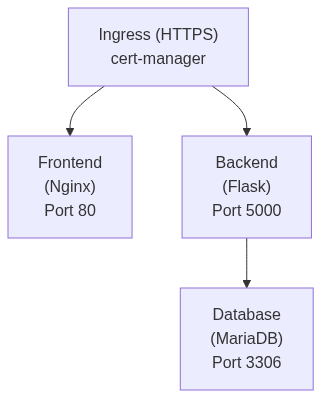
The Dengue Dashboard is a three-tier web application consisting of:
- Frontend: React/Vite application served by Nginx (port 80)
- Backend: Flask API application (port 5000)
- Database: MariaDB database (port 3306)
All services are exposed through an Nginx Ingress Controller with automatic TLS certificate management via cert-manager.
Directory Structure
Components
Base Resources
| Component | Service | Replicas | Image | Resources | Notes |
|---|---|---|---|---|---|
| Backend (backend.yml) | ClusterIP service exposing the Flask API on port 5000 | 2 | GitLab container registry (tag overridden per environment) | Requests: 128Mi RAM, 100m CPU; Limits: 512Mi RAM, 500m CPU | Pulls from regcred for private registry access |
| Frontend (frontend.yml) | ClusterIP service exposing the Nginx server on port 80 | 2 | GitLab container registry (tag overridden per environment) | Requests: 64Mi RAM, 50m CPU; Limits: 312Mi RAM, 300m CPU | |
| Database (database.yml) | ClusterIP service exposing MariaDB on port 3306 | 1 (single instance) | mariadb:lts | Requests: 256Mi RAM, 250m CPU; Limits: 312Mi RAM, 300m CPU | EmptyDir volume (⚠️ non-persistent) |
Health Checks
| Component | Health Checks |
|---|---|
| Backend (backend.yml) | Readiness probe on / (10s delay, 10s interval); Liveness probe on / (30s delay, 20s interval) |
| Frontend (frontend.yml) | Readiness probe on / (3s delay, 10s interval); Liveness probe on / (10s delay, 20s interval) |
| Database (database.yml) | TCP socket probes on port 3306 |
⚠️ Note: These are the current resources being used, changes may apply in the future.
4. Ingress (ingress.yml)
Configures external access to the application:
- TLS: Automatic certificate provisioning via cert-manager (Let's Encrypt)
- Force HTTPS: Redirects HTTP to HTTPS
- Routing:
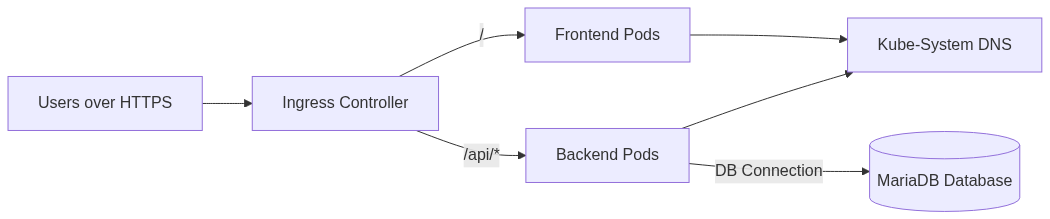
/(.*)→ Frontend service (port 80)/api/?(.*)→ Backend service (port 5000)
- Host: Configured per environment via overlays
5. Network Policies (network-policies.yml)
Implements zero-trust network security:
| Policy | Name | Ingress | Egress |
|---|---|---|---|
| Database Policy | dengue-db-netpol | Only accepts connections from backend pods on port 3306 | Only DNS queries to kube-system |
| Backend Policy | dengue-backend-netpol | Only accepts connections from ingress-nginx on port 5000 | DNS queries to kube-system; Database connections on port 3306; (Optional) External SMTP on ports 25/587/465 |
| Frontend Policy | dengue-frontend-netpol | Only accepts connections from ingress-nginx on port 80 | Only DNS queries to kube-system |
| Default Deny All | default-deny-all | N/A | Denies all traffic not explicitly allowed by other policies |
Configuration Management
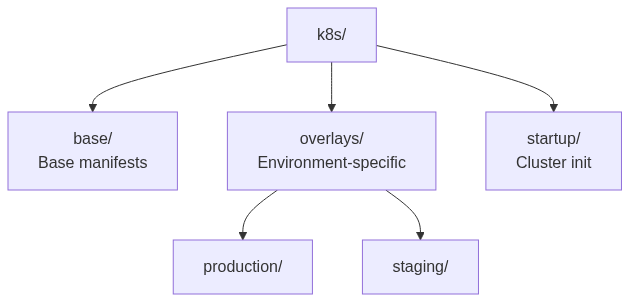
Configuration is managed through Kustomize with a base + overlays pattern:
- Base: Contains common configuration in
.envfiles - Overlays: Environment-specific values that override base settings
The kustomization.yaml files use configMapGenerator to create ConfigMaps from .env files.
Kubernetes Deployment Guide
Prerequisites
- Kubernetes cluster (v1.19+)
kubectlconfigured with cluster accesskustomize(built into kubectl 1.14+)- cert-manager installed for TLS certificates
- Nginx Ingress Controller installed
Initial Cluster Setup
Run these commands once when setting up a new cluster:
# Apply cluster-wide resources (cert-manager, namespaces, RBAC)
kubectl apply -k k8s/startup/
This creates:
- Let's Encrypt cluster issuer
- Namespaces for staging and production
- Service accounts for image pulling and GitLab agents
- RBAC permissions
Deploy to Staging
# Deploy staging environment
kubectl apply -k k8s/overlays/staging/

# Verify deployment
kubectl get pods -n dengue-dashboard-staging
kubectl get ingress -n dengue-dashboard-staging
Deploy to Production
# Deploy production environment
kubectl apply -k k8s/overlays/production/

# Verify deployment
kubectl get pods -n dengue-dashboard-prod
kubectl get ingress -n dengue-dashboard-prod
Environment Configuration
Base Configuration (.env)
Located in k8s/base/.env, these values are shared across all environments:
PORT=5000
FLASK_APP=app:app
PYTHONUNBUFFERED=1
DB_HOST=dengue-db
DB_PORT=3306
DB_TYPE=mysql+pymysql
MAIL_SERVER=smtp
MAIL_PORT=25
MAIL_USE_TLS=false
MAIL_USE_SSL=false
Environment-Specific Configuration
Each overlay directory contains an .env file with environment-specific overrides:
Staging (k8s/overlays/staging/.env):
ENV=staging
DB_NAME=dengue_staging
VITE_API_BASE_URL=https://staging.example.com/api
ALLOWED_ORIGINS=https://staging.example.com
Production (k8s/overlays/production/.env):
ENV=production
DB_NAME=dengue_production
VITE_API_BASE_URL=https://dengue.example.com/api
ALLOWED_ORIGINS=https://dengue.example.com
Secrets
Sensitive values (database passwords, API keys) should be stored in Kubernetes Secrets:
# Create secret manually
kubectl create secret generic dengue-env \
  --from-literal=MARIADB_ROOT_PASSWORD=your-root-password \
  --from-literal=MARIADB_USER=dengue_user \
  --from-literal=MARIADB_PASSWORD=your-db-password \
  -n dengue-dashboard-staging

# Or create from file
kubectl create secret generic dengue-env \
  --from-env-file=secrets.env \
  -n dengue-dashboard-staging
Required secret keys:
MARIADB_ROOT_PASSWORD: MariaDB root passwordMARIADB_USER: Application database userMARIADB_PASSWORD: Application database password
Image Registry Credentials
For pulling images from private GitLab registry:
kubectl create secret docker-registry regcred \
  --docker-server=registry.gitlab.com \
  --docker-username=<gitlab-username> \
  --docker-password=<gitlab-token> \
  --docker-email=<email> \
  -n dengue-dashboard-staging
Network Policies
The application uses Kubernetes Network Policies to implement microsegmentation:
Traffic Flow
Default Deny
A default deny policy blocks all traffic not explicitly allowed. This ensures:
- No pod-to-pod communication unless permitted
- No egress to external networks unless permitted
- No ingress from outside the cluster unless through ingress controller
Enabling External SMTP
If the backend needs to send emails to external SMTP servers, uncomment the SMTP egress rules in network-policies.yml:
# In backend egress section
- to:
    - namespaceSelector: {}
  ports:
    - protocol: TCP
      port: 25
    - protocol: TCP
      port: 587
    - protocol: TCP
      port: 465
Common Tasks
Scale Deployments
# Scale backend to 3 replicas
kubectl scale deployment dengue-backend --replicas=3 -n dengue-dashboard-staging

# Scale frontend to 1 replica
kubectl scale deployment dengue-frontend --replicas=1 -n dengue-dashboard-staging
Update Configuration
# Edit .env file in appropriate overlay
vim k8s/overlays/staging/.env

# Apply changes
kubectl apply -k k8s/overlays/staging/

# Restart deployments to pick up new config
kubectl rollout restart deployment/dengue-backend -n dengue-dashboard-staging
kubectl rollout restart deployment/dengue-frontend -n dengue-dashboard-staging
View Configuration
# View current ConfigMap
kubectl get configmap dengue-config -n dengue-dashboard-staging -o yaml

# View environment variables in a pod
kubectl exec <pod-name> -n dengue-dashboard-staging -- env
Rollback Deployment
# View rollout history
kubectl rollout history deployment/dengue-backend -n dengue-dashboard-staging

# Rollback to previous version
kubectl rollout undo deployment/dengue-backend -n dengue-dashboard-staging

# Rollback to specific revision
kubectl rollout undo deployment/dengue-backend --to-revision=2 -n dengue-dashboard-staging
CI/CD Integration
Staging and Production deployments are automated in the pipeline
Development Workflow
Running Specific Services
If you only want to run specific services, append the service name to the docker compose command:
# Run only the frontend
docker compose up --build frontend

# Run only the backend
docker compose up --build backend

# Run backend with linting
docker compose up --build backend-lint
Stopping the Application
To stop all running services:
docker compose downTo stop and remove all data (including the database):
docker compose down -vViewing Logs
To view logs for all services:
docker compose logs -fTo view logs for a specific service:
docker compose logs -f backend
docker compose logs -f frontend
Rebuilding After Changes
If you make changes to dependencies or Docker configuration, rebuild the containers:
docker compose up --buildFor code changes in the frontend/src or backend/app directories, the changes should be reflected automatically due to volume mounts (hot reload).
Testing
Backend Tests
Run backend tests:
docker compose exec backend pytestFrontend Tests
Run frontend unit tests:
docker compose exec frontend npm run test:unitRun Cypress end-to-end tests:
docker compose exec frontend npm run cypress:openTroubleshooting
Common Issues
Port Already in Use If you get an error that a port is already in use, you can either:
- Stop the conflicting service
- Change the port mapping in
docker-compose.yml
Database Connection Issues
- Ensure the database container is healthy:
docker compose ps - Check database logs:
docker compose logs db - Verify environment variables in
.envmatch the database credentials
Frontend Not Loading
- Check that the frontend container is running:
docker compose ps - Verify the
VITE_API_BASE_URLin.envis set correctly - Check frontend logs:
docker compose logs frontend
Permission Issues (Linux/WSL) If you encounter permission issues with volumes:
sudo chown -R $USER:$USER .Resetting the Database
To reset the database to a clean state:
docker compose down -v
docker compose up --build
Clean Installation
For a completely fresh installation:
docker compose down -v
docker system prune -a
copy .env.example .env
docker compose up --build
Contributing
- Create a feature branch from
development - Make your changes
- Test your changes locally
- Submit a merge request
License
See the LICENSE file for details.
Support
For issues and questions, please create an issue in the GitLab repository.